Commands
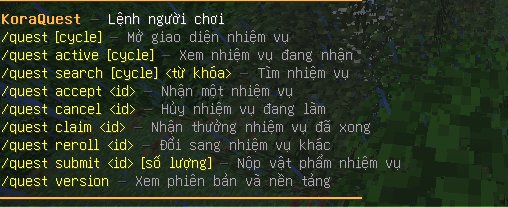
KoraQuest filters command help and tab completion by permission. Normal players only see player commands. Administrators see the commands allowed by their administrator permissions.
Player commands
| Command | Description | Permission |
|---|---|---|
/quest |
Open the main quest menu | koraquest.command.open |
/quest help |
Show commands available to the sender | None |
/quest <cycle> |
Open a cycle directly, such as daily or weekly |
koraquest.command.open |
/quest active [cycle] |
List active quests, optionally filtered by cycle | koraquest.command.open |
/quest search [cycle] <keyword> |
Open the GUI with a text search | koraquest.command.open |
/quest accept <quest-id> |
Accept an available quest | koraquest.command.accept |
/quest cancel <quest-id> |
Cancel an active quest | koraquest.command.cancel |
/quest claim <quest-id> |
Claim a ready quest | koraquest.command.claim |
/quest complete <quest-id> |
Alias of /quest claim |
koraquest.command.claim |
/quest reroll <quest-id> |
Replace an eligible quest | koraquest.command.reroll |
/quest submit <quest-id> [amount] |
Submit matching items | koraquest.command.submit |
/quest version |
Show plugin version, platform and storage type | None |
Available default cycle shortcuts:
Administrator commands
| Command | Description | Permission |
|---|---|---|
/quest admin |
Show administrator command help | Any KoraQuest admin permission |
/quest admin help |
Show administrator command help | Any KoraQuest admin permission |
/quest admin reload |
Reload configuration and messages | koraquest.admin.reload |
/quest admin reset [cycle] |
Rotate the selected cycle; defaults to Daily | koraquest.admin.reset |
/quest admin create <id> <cycle> <difficulty> <type> <target> <required> [material] |
Create a quest skeleton | koraquest.admin.editor |
/quest admin delete <quest-id> |
Delete a quest definition | koraquest.admin.editor |
/quest admin progress <player> <quest-id> <amount> |
Add quest progress manually | koraquest.admin.progress |
/quest admin retryrewards |
Retry pending reward claims | koraquest.admin.rewardretry |
/quest admin validate |
Validate cycles and quest definitions | koraquest.admin.editor |
/quest admin types |
List objective types and target hints | koraquest.admin.editor |
/quest admin editor [quest-id] |
Open the in-game editor | koraquest.admin.editor |
/quest editor [quest-id] |
Shortcut for the in-game editor | koraquest.admin.editor |
/quest admin update |
Check for a newer release | koraquest.admin.update |
/quest update |
Shortcut for update checking | koraquest.admin.update |
Examples
/quest accept daily_break_stone
/quest submit daily_submit_wheat 64
/quest search weekly mining
/quest admin reset seasonal
/quest admin progress Steve daily_break_stone 25
/quest admin create test_quest daily EASY BREAK STONE 100 DIAMOND_PICKAXE
Note
/quest admin reset seasonal starts a new Seasonal cycle because the default Seasonal reset type is MANUAL.